

How Often Should You Clean Dust Filters on Rackmount Enclosures?
In the high-stakes world of IT infrastructure and industrial automation, dust is the silent enemy. It creeps into server racks, clogs ventilation paths, and insulates heat-generating components, leading to thermal throttling or catastrophic hardware failure. While most system administrators focus on the servers themselves, the rack server housing that protects them is often overlooked until a temperature alarm screams for attention.
Maintaining the cleanliness of your rackmount enclosures isn't just about aesthetics; it is a critical component of preventive maintenance. But this begs the question: what is the optimal frequency for cleaning these filters to ensure longevity without causing unnecessary downtime?
The Physics of Dust and Thermal Dynamics
To understand when to clean, we must first understand why dust is so detrimental. Dust accumulation acts as a thermal insulator. When dust clogs the filters of a 2u chassis enclosure or coats the internal components, it restricts airflow and traps heat.
According to industry maintenance guides, a buildup of dust on heat sinks and fans can cause internal cabinet temperatures to rise significantly. In severe cases, unchecked dust accumulation has been linked to a temperature rise of over 10°C, which can correlate with a 30% increase in hard drive failure rates due to overheating.
Furthermore, dust can be hygroscopic (absorbing moisture), which, in humid environments, can lead to corrosion on PCBs or even short circuits. Therefore, the cleaning schedule is not arbitrary; it is dictated by the laws of thermodynamics and the specific environmental conditions of your deployment.
Frequency Guidelines: The "It Depends" Factor
There is no single "correct" answer for every facility, but industry standards provide a solid baseline. The frequency of cleaning depends heavily on the environment:
Standard Office/Server Room: In a climate-controlled, clean environment, a quarterly (every 3 months) cleaning schedule is generally sufficient. This aligns with standard HVAC maintenance cycles.
Industrial/High-Dust Environments: For facilities near manufacturing floors, construction sites, or in areas with poor air quality, the interval should be shortened to monthly or even bi-monthly.
A practical rule of thumb found in facility management literature suggests that filter pads in high-dust environments (like metallurgy or automotive plants) may need replacement or cleaning every 2 months to maintain a 40% improvement in airflow intake.
Pro Tip: Don't rely solely on a calendar. Implement a visual inspection routine. If the filter looks gray or clogged during a weekly walk-through, clean it immediately, regardless of the schedule.
The Critical Role of the 3U Rack Enclosure
When discussing airflow and maintenance, the physical dimensions of the enclosure play a surprisingly large role. A 3u rack enclosure offers a distinct advantage over smaller form factors regarding thermal mass and air volume.
Because a 3U unit provides more vertical space (5.25 inches) compared to a 1U or 2U unit, it allows for better air circulation around the components. However, this also means that the intake filters on a 3u rack enclosure have a larger surface area to protect. While the larger volume allows the system to tolerate minor dust accumulation slightly longer than a cramped 1U chassis, the sheer volume of air moving through a 3U system means the filters can capture debris faster in high-velocity setups.
For integrators using a 3u rack enclosure for heavy-duty storage or industrial PCs, checking the intake filters monthly is a safe bet to ensure the internal fans aren't working overtime to push air through a clogged mesh.
Maintenance Procedures for the 2U Rack Server Case
The 2u rack server case is the workhorse of modern data centers. It strikes a balance between density and expandability. However, its compact nature means that thermal headroom is slim.
When maintaining a 2u rack server case, the procedure must be meticulous:
Power Down and Ground: Safety first. Always disconnect power and use an ESD (Electrostatic Discharge) strap. Static electricity can damage sensitive logic boards just as easily as heat can.
Filter Removal: Most quality rackmount housings feature slide-out or snap-off filter trays. Remove these gently.
Cleaning Method:
Light Dust: Use a vacuum cleaner with a soft brush attachment on a low-power setting.
Heavy Dust: Wash reusable foam filters with mild soap and water. Crucial: They must be 100% dry before reinstallation. Reinstalling wet filters introduces moisture to the electronics, which is fatal.
Compressed Air: For the internal heatsinks and fans, use compressed air (canned air or an electric blower) to dislodge caked-on dust. Always hold the fan blades in place while blowing air to prevent the fan from spinning uncontrollably and generating back-voltage.
Visualizing the Impact
To truly grasp the importance of this maintenance, one only needs to look at the difference between a maintained unit and a neglected one.

Caption: The filter on the right was removed from a 2u chassis enclosure after 12 months of operation in an unfiltered environment. Note how the mesh is completely obscured, effectively turning the cooling system into an oven.
Material Considerations in Rack Server Housing
The material of your rack server housing also dictates how you clean the exterior. Most modern housings are made of cold-rolled steel (SPCC) or aluminum with a powder-coat finish.
Avoid Solvents: Do not use alcohol, benzene, or thinners to clean the exterior of the rack server housing. These chemicals can degrade the powder coating, leading to rust and corrosion over time. A mild detergent solution and a soft microfiber cloth are sufficient for removing fingerprints and grime.
Sealing Integrity: While cleaning, inspect the door gaskets and seals. A compromised seal on a 2u rack server case renders even the best filter useless, as unfiltered air will bypass the intake and enter through the gaps.
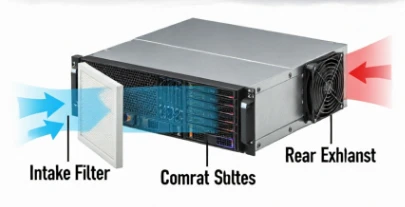
Caption: Proper airflow is essential. Dust accumulation at the intake (Stage 1) creates a vacuum effect that strains the fans and reduces the efficiency of the entire cooling chain.
Conclusion: Prevention is Cheaper than Cure
The cost of a can of compressed air or a replacement filter is negligible compared to the cost of a server replacement or data loss. By establishing a rigorous cleaning schedule-quarterly for clean rooms, monthly for industrial settings-you ensure that your rack server case systems operate at peak efficiency.
Remember, a clean rack is a cool rack, and a cool rack is a reliable rack. Don't wait for the fans to sound like a jet engine; check your filters today.

